
Moneylogz App · AI Assistance
Ask about your money. Get answers you can check.
Ask the way you would ask a person: “How much did I spend each month this year?” AI Assistance works out which of your data answers it, reads it, and replies with figures you can open and verify, one click from the records behind them.
Three ways in, one history
All three show the same conversations, so a question started on one screen can be picked up on another.

The floating panel
- The sparkle button in the bottom right of every screen opens a panel over whatever you are looking at. New, Expand, Minimize and Close in its header.

The expanded drawer
- A wide drawer down the right with your conversation history beside the conversation. The quickest way back to an earlier question.

The full screen
- AI Assistance in the sidebar opens it as a screen of its own, with the room a wide card needs. A pill says Ready, or Running while an answer is built.
What you can ask
It reads the same data as the rest of the app. A new conversation suggests a few questions per topic to start with.
Transactions
- “What were my largest charges last month, excluding Gusto?”
Spending
- “Am I spending more this month than last month?”
Balances
- “What’s my net worth? When is my credit card due?”
Money in
- “What money came in over the last 3 months, and what was earnings?”
Documents
- “Which receipts still aren’t matched to a transaction?”
Accounts
- “Do any of my connections need attention?”
Investments
- “Show my investments overview. What did VTI pay in dividends?”
Billing
- “What plan am I on, and how many accounts does it allow?”
How an answer is built
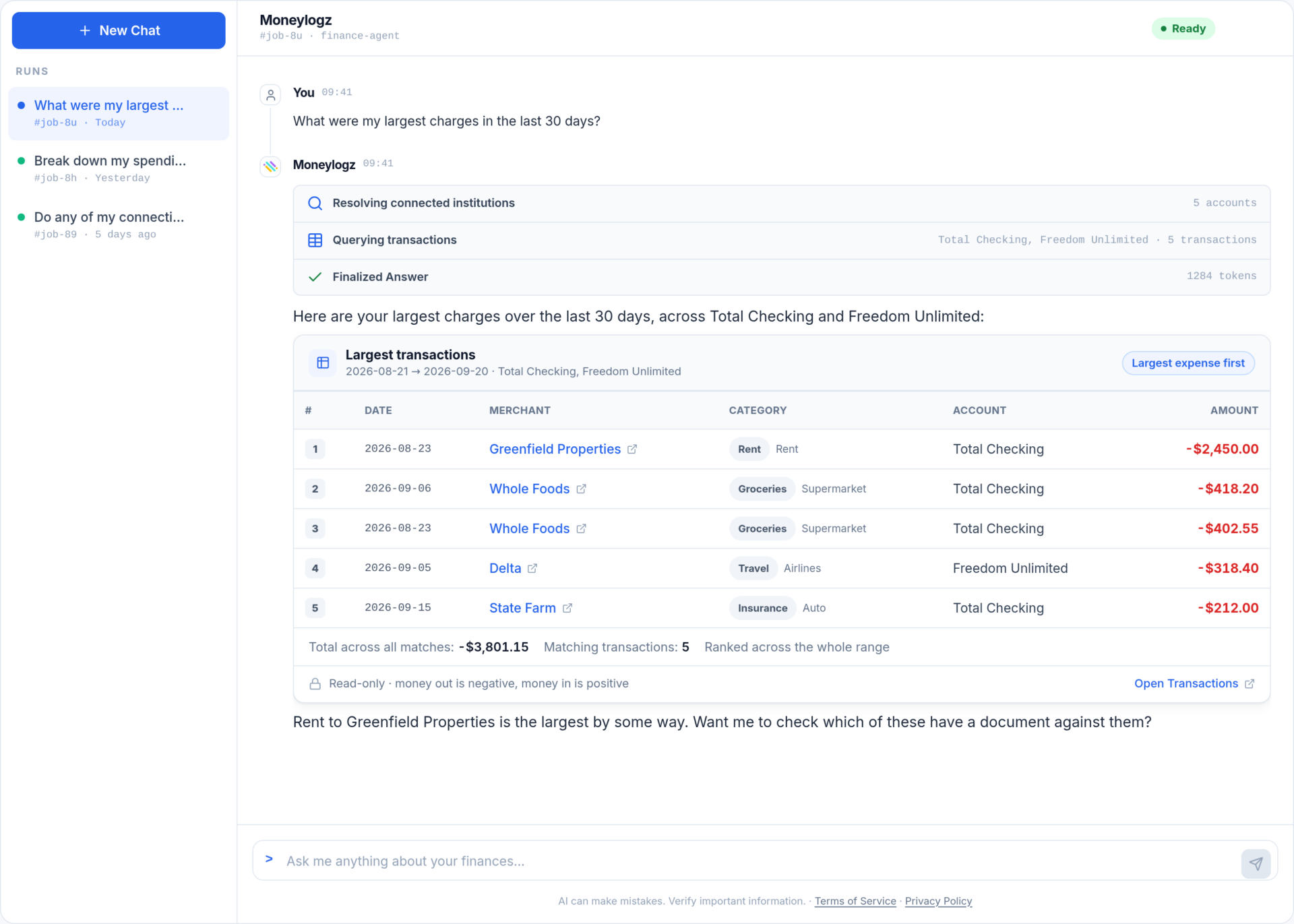
- The steps appear first and say what was looked at: Querying transactions, with the accounts read and how many came back; Reading balances; Searching documents. The quickest way to check it read the accounts you meant.
- A sentence saying what you are looking at, with the key figures in bold.
- The card, carrying the figures. Every number is read straight from your data, never retold by the model.
- Links on every row, to that transaction, document, account or holding on its own screen.
Where a sentence and a card disagree, the card is right. Its figures come from your accounts; the sentence is written around them.
Questions about AI Assistance
Does it remember earlier questions?
Within a conversation, yes: “and the month before?” is understood. Conversations are kept in your history until you delete them, and the drawer and full screen list them.
Which plan includes it?
Every plan. AI Assistance is available to any account with an active plan or trial.
Where does my data go?
Your question and only the account data needed to answer it are sent to our AI provider, as the terms card states before your first question. The privacy policy lists what is stored and for how long.
Ask your first question
14-day free trial on every plan. Connect an account, then ask “What’s my net worth?”